
If you’re in HVAC, plumbing, or electrical, you know Housecall Pro. It’s the big name at every trade show. But is it actually the right fit for your business?
The field service market is exploding to jump from $5 billion to over $23 billion in the next decade. With that growth comes a wave of new Housecall Pro competitors ready to step up.
Maybe their costs are creeping up faster than your revenue. Maybe you’re tired of hitting a “paywall” just to add one more tech. Or perhaps those QuickBooks sync issues are making your accountant want to scream. You need software that works with you, not against you.
Let’s look at the wins, the warts, and the five best alternatives to save your sanity and your bottom line.
What Is Housecall Pro and Who Is It For?
What is Housecall Pro? It’s the “command center” for your field service business, a cloud-based platform that combines scheduling, dispatching, invoicing, and payments into one tool. Perfect for small to mid-sized teams tired of juggling multiple apps. But as businesses grow, questions arise: What are Housecall Pro’s costs? How does it compare to Jobber? Why is the QuickBooks sync tricky? It’s great for getting started, but is it built for long-term growth? Let’s find out.
Ready to get started with Field Promax?
1. The Core Features
Housecall Pro covers the basics pretty well. If you need to run a day-to-day operation, it checks the boxes:
- Job scheduling and dispatching: Drag-and-drop calendars to get the right tech to the right place, just like some top Housecall Pro competitors.
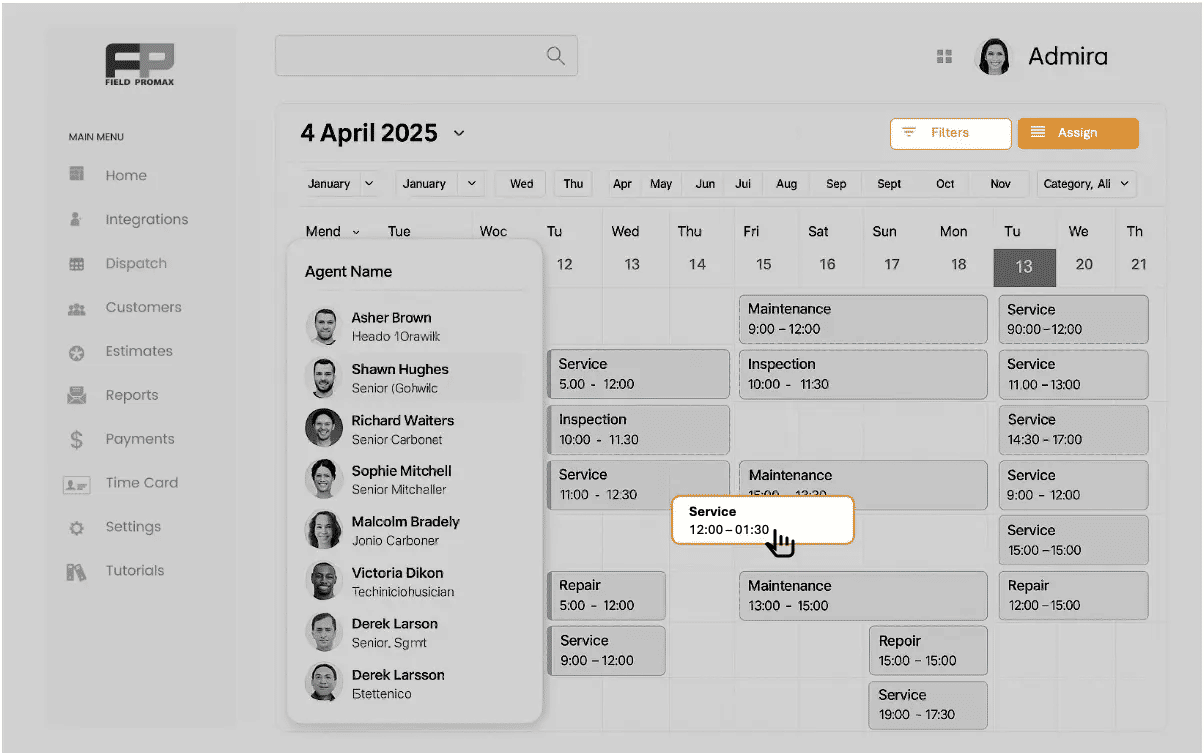
- Mobile app: So your techs can see where they’re going without calling the office ten times.
- Invoicing: Sending bills straight from the driveway using either housecall pro or a top housecall pro alternative.
- Customer communication: “On my way” texts that customers love.
- Online payments: Getting paid before the truck leaves the driveway.
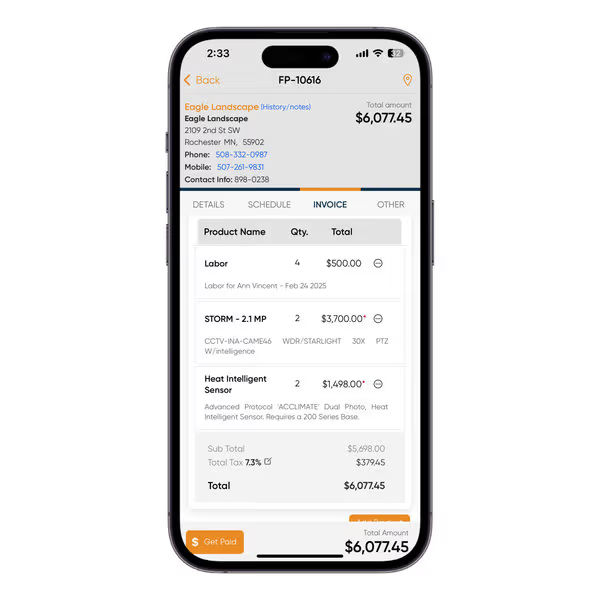
For a lot of owners, the appeal is simplicity. It’s about killing the paperwork beast. Still, they often start weighing housecall pro vs servicetitan and other field service management platforms to assess which offers better QBO integrations and scalable workflows.
2. Types of Service Businesses That Commonly Use Housecall Pro
Housecall Pro is popular among:
- HVAC contractors: Streamlining jobs without paperwork headaches.
- Plumbing companies: Managing tasks without manual entry overload.
- Electrical services: Automating schedules with ease.
- Cleaning services: Simplifying admin work for busy teams.
- Lawn care businesses: Boosting profits without getting bogged down.
- General home service teams: A versatile tool for small teams.
Ideal for smaller companies needing a user-friendly system with preset workflows.
Housecall Pro Pricing Breakdown and Hidden Costs
Price is usually the biggest reason businesses start hunting for alternatives. On the surface, the numbers look simple. But as your team grows? It gets expensive fast. That’s why so many pros end up digging through pricing breakdowns, wondering if there’s a better way to scale without breaking the bank.
1. What Are the Pricing Options for Housecall Pro?
Housecall Pro pricing is subscription-based and typically billed monthly or annually. Plans are tiered based on features and user limits, not just overall usage. That means growing your team often means upgrading plans, even if you only need one additional feature. If you’ve ever wondered, “How much does housecall pro cost?” or “Is house call pro pricing competitive?” you aren’t alone.
2. Current Pricing Plans and What Each Includes
While exact pricing can change, Housecall Pro plans generally follow this structure:
- Basic plans: Designed for very small teams with limited features.
- Mid-tier plans: Unlock automation, reporting, and QuickBooks. Another key area where housecall pro integrations come into play.
- Higher-tier plans: Come with advanced features, more users, and priority support.
Many important features, like advanced reporting, automations, and accounting (like integrated QuickBooks and QBO integrations), are not available on entry-level plans.

3. Additional Fees, Add-Ons, and Per-User Costs
This is where the “budget-friendly” plan starts to feel a bit tight. The base price looks great until the extras start rolling in:
- Per-user or per-tech fees
- Higher payment processing rates
- Extra costs for marketing tools
- Paying more just for QuickBooks sync
As one plumber told us, “The starting price was fine, but once I added two techs and needed my accounting to sync, the bill went way up.” For a small business, those “hidden” upgrades can eat your margins faster than a leaky pipe. Before you sign on the dotted line, make sure you know what you’re actually paying for.
4. How Do Housecall Pro’s Fees Compare to Other Service Management Software?
Compared to other field service platforms, Housecall Pro often sits in the mid-to-high price range for small teams. Some housecall pro competitors offer:
- Flat pricing regardless of user count
- Built-in accounting sync at lower tiers
- Fewer locked features behind upgrades, making them popular choices among those seeking housecall pro alternatives.
For businesses watching margins closely, the total cost of ownership and not just the “housecall pro cost” or house call pro pricing matters more than the advertised monthly rate.
5. How Housecall Pro Pricing Compares to the Market
In 2026, the market has shifted. Service businesses now expect transparent pricing, predictable costs, and flexibility. Housecall Pro can still work for very small teams, but it often becomes one of the more expensive options as you scale. If you search “housecall pro vs jobber” or “housecall pro vs service titan,” you’ll see cost is a common sticking point.
Field Promax, on the other hand, offers cost-effective, scalable plans with comprehensive features and no hidden fees, making it a favorite among those exploring Housecall Pro alternatives.
Housecall Pro Reviews and Common Complaints
Reviews of Housecall Pro are mixed. Many users like the interface and core functionality, but recurring complaints show up across review platforms. Housecall pro reviews repeatedly note both ease of use and frustrations with cost or integrations. In comparison, some housecall pro alternatives provide smoother quickbooks online integration and better value.
1. What Users Like About Housecall Pro
Positive feedback often mentions:
- Easy setup for new users
- Clean mobile app for technicians
- Helpful customer support during onboarding
- Strong customer communication tools
For teams moving away from paper invoices or spreadsheets, Housecall Pro can feel like a big step forward, according to housecall pro reviews. However, others end up seeking housecall pro competitors when growth and integrations become priorities.

2. Housecall Pro Reviews complaints: Common Complaints From Real Users
Negative reviews focus on a few key issues:
- Pricing increases as teams grow.
- Key features are locked behind more expensive plans.
- QuickBooks sync requires manual corrections.
- Reporting lacks depth, and automation rules feel rigid.
As one HVAC owner put it, “It works, but I’m working around the software instead of the software working for me.”
That’s where Field Promax steps in. It solves those common headaches with scalable pricing, deep reporting, and a QuickBooks integration that actually works. It’s flexible automation designed to adapt to your business, not the other way around.
3. When Housecall Pro May Not Be the Right Fit
Housecall Pro might not be your best fit if:
- You’re planning to scale your team fast.
- You need deep, detailed accounting reports.
- You want a full QuickBooks sync without paying for a premium tier.
- Your jobs are complex and need flexible, custom workflows.
.webp?updatedAt=1747733769101)
If any of these sound like you, it’s time to start looking at alternatives that offer more control and fewer headaches over the long haul.
Housecall Pro and QuickBooks Integration Explained
Accounting integration is a deal-breaker for many service businesses. QuickBooks Online is widely used across the U.S. and Canada, so smooth syncing is critical. Housecall pro integrations with QBO integrations are closely examined by most buyers, especially when comparing housecall pro competitors.
1. How Does Housecall Pro Integrate With QuickBooks Online?
Housecall Pro integrates seamlessly with QuickBooks Online through a built-in connection available on certain plans. This direct housecall pro integrations feature is designed to reduce manual data entry by automatically syncing invoices, payments, and customer information in real time, saving you time and improving accuracy.
2. Housecall Pro QuickBooks Integration: Data That Syncs
Typically, the following data can sync between housecall pro and QuickBooks Online integration:
- Customers
- Invoices
- Payments
- Basic tax information
On paper, this sounds sufficient. In real-world use, the experience can vary depending on how complex your accounting setup is, especially with QBO integrations in the mix.
3. Limitations, Sync Issues, and Accounting Workarounds
Many users report limitations such as
- Partial data syncing in housecall pro integrations
- Delays or duplicate entries in QBO integrations
- Limited control over chart of accounts mapping when you integrate QuickBooks
- Manual corrections needed in QuickBooks after using house call pro or other housecall pro competitors
These issues often lead teams to double-check books or rely on accountants to clean things up.
4. Impact of Integration Limitations on Financial Reporting
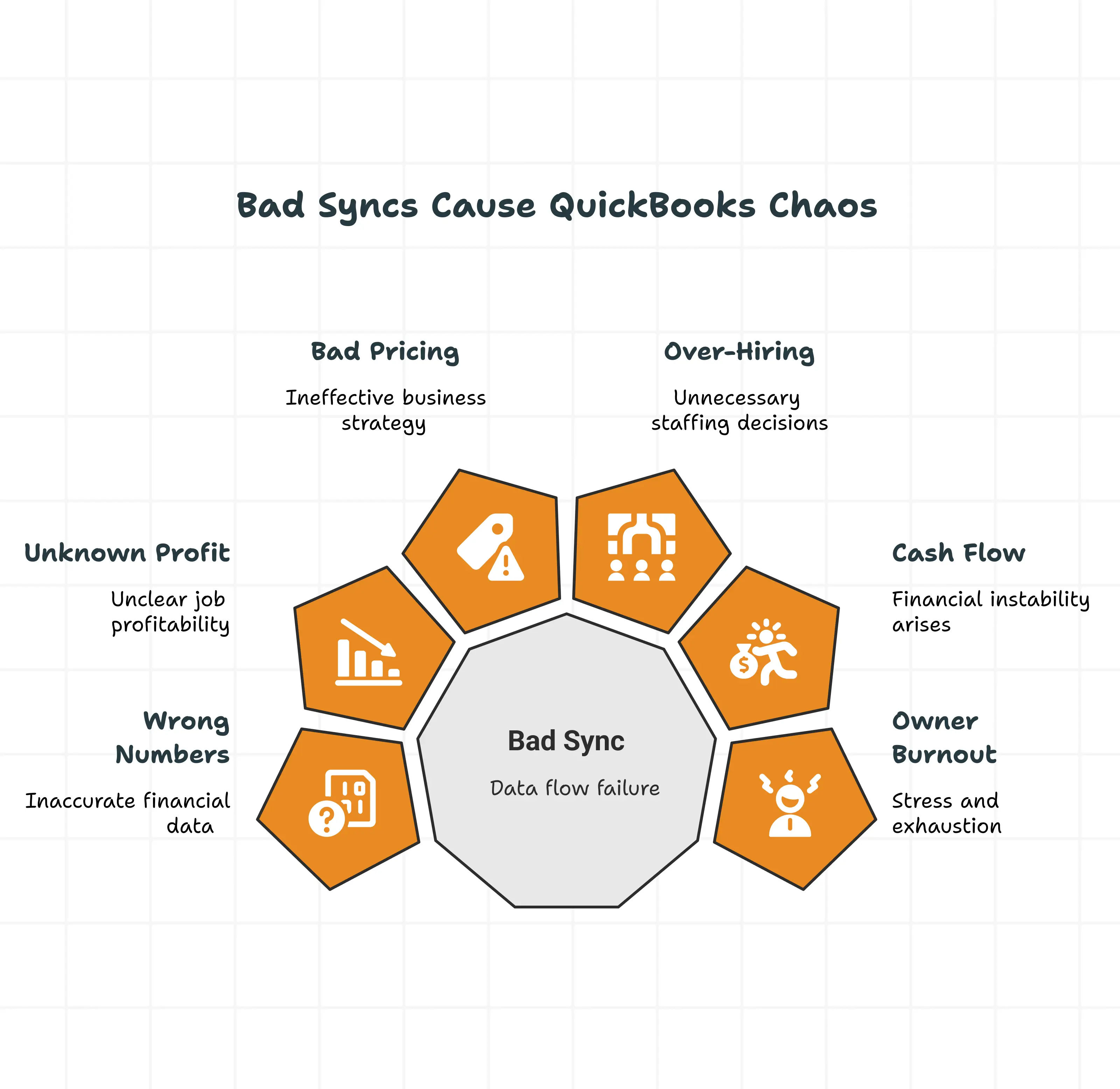
When data doesn’t sync cleanly, it’s more than just a bookkeeping headache; it’s a fog over your entire business.
Poor integration leads to:
- Profit and loss reports that just don’t add up.
- Job margins that leave you guessing.
- Endless hours matching up accounts because the sync stumbled.

For owners craving real-time clarity, these gaps are a total momentum killer. While basic sync works for some, growing businesses often find themselves spending more time fixing the records than actually using them. It’s exactly why many start hunting for Housecall Pro alternatives that can actually keep up.
.webp)
5. Housecall Pro and QuickBooks Integration and Pricing
Integration access is closely tied to housecall pro pricing tiers, which is another sticking point for many users who would prefer to integrate QuickBooks on any plan.
6. Does Housecall Pro Integrate Natively With QuickBooks Online?
Yes, Housecall Pro offers native QuickBooks Online integration. But there’s a catch. It isn’t available on all plans. Lower-tier subscriptions may not include accounting sync at all, forcing businesses to upgrade to a pricier plan just to get basic bookkeeping features, the sort of thing some housecall pro competitors include at every tier.
7. How Pricing Tiers Affect QuickBooks Integration Access
In most cases:
- Entry-level plans do not include QuickBooks integration (even though users expect housecall pro integrations)
- Mid-to-high tiers unlock syncing features (reflecting in housecall pro pricing)
- Larger teams often need premium plans to maintain access
This means accounting needs often dictate which plan you choose, not just team size. If you’re comparing housecall pro vs jobber or housecall pro vs servicetitan, check which platform offers integrations without expensive upgrades.
8. Housecall Pro Software: Does It Integrate With QuickBooks Online
Simple workflows are easy. But add complex taxes or detailed reporting, and those Housecall Pro workarounds start to feel shaky.
Reliability shouldn’t be a roll of the dice. Too many owners get stuck in a “pay-to-play” model where basic accounting feels like a luxury upgrade. When choosing software, think about the “future you.” Is this platform going to help you scale, or hold your data hostage behind higher pricing tiers just as you start to grow?
Top 5 Housecall Pro Alternatives for 2026
If the pricing tiers, user limits, and sync issues are giving you a headache, you aren’t alone. “Housecall pro alternatives” is a more popular search than ever. In 2026, you have better options. Options that respect your budget and your workflow.
Here are the five heavy-hitter services owners are switching to.
1. Field Promax
Field Promax is for the owner who wants control without the chaos. It’s built for field service businesses that need clarity and predictable costs.
Why It’s Different: Field Promax uses a flat, transparent pricing model. No surprises. They don’t punish you for growing. Hire a new tech, and you won’t have to jump up two pricing tiers. You can plan your budget without crossing your fingers.
QuickBooks Integration: This is where it shines. The integration isn’t an afterthought; it’s core to the product. It focuses on accuracy, so you won’t find duplicates or lost invoices. It just works.
Best Features:
- Drag-and-drop job scheduling and dispatch.
- Digital estimates and invoices.
- Real-time mobile access for techs.
- Work order tracking.
- Built-in QuickBooks Online sync.
.png?updatedAt=1747763704661)
Pros:
- Transparent pricing.
- Solid QuickBooks integration.
- Simple workflows teams actually use.
Cons:
- Fewer marketing features compared to larger platforms.
Best For: HVAC, plumbing, electrical, and maintenance businesses that want reliable operations without the “bloat tax.”
2. Jobber
Jobber is the other big name you’ll see constantly compared to Housecall Pro.
The Lowdown: Jobber is clean and easy to use. For small teams, the pricing is competitive. But just like Housecall Pro, once you start adding people, the costs climb with you.
QuickBooks: It integrates, but some users report needing to tweak their accounting setup to make it flow smoothly. It’s functional, but keep an eye on it.
Pros:
- Very user-friendly design.
- Great customer portal.
Cons:
- Feature limits on lower tiers.
- Gets expensive as you scale.
Best For: Solo operators or small teams who value a pretty interface over deep customization.
3. ServiceTitan
ServiceTitan is an 800-pound gorilla. It’s massive, powerful, and expensive.
The Lowdown: This is enterprise-level stuff, contracts, onboarding fees, and a serious commitment. It can do almost anything, but that power comes with complexity.
QuickBooks: Powerful reporting, but it isn’t plug-and-play and often requires a consultant to set up
Pros:
- Incredible depth of features.
- Unmatched reporting.
Cons:
- Expensive (enterprise pricing).
- Requires contracts.
- Overkill for most mid-sized shops.
Best For: Large, multi-location companies with dedicated office staff to run the beast.
4. FieldPulse
FieldPulse tries to find the middle ground, being more flexible than Housecall Pro but cheaper than ServiceTitan.
The Lowdown: They use a modular pricing structure, so you pay for what you need. This is great for customization, but if you need a lot of features, the costs add up.
QuickBooks: Integrates reasonably well. Some users note delays, but it generally gets the job done.
Pros:
- Highly configurable.
- Good balance of power and usability.
Cons:
- Modular pricing can get confusing and pricey.
Best For: Growing teams who want to build a specific workflow.
5. Connecteam
Connecteam isn’t a traditional Field Service Management (FSM) tool, but people still look for it as a basic alternative.
The Lowdown: It’s an employee management app. Great for time clocks and communication, but it lacks the heavy lifting of estimating and invoicing.
QuickBooks: Limited. You’ll need to pair it with other software to run your billing, which defeats the purpose of an all-in-one solution.
Pros:
- Very affordable.
- Great for managing hourly employees.
Cons:
- Not a full FSM replacement.
- Lacks deep job management tools.
Best For: Managing a workforce, not running a service business end-to-end.
Housecall Pro vs Competitors: Key Differences That Matter
When comparing options like housecall pro vs jobber, housecall pro vs servicetitan, or any top housecall pro alternatives, a few differences matter more than lengthy feature lists.
1. Pricing Transparency
Flat pricing models help owners forecast costs as teams grow. Tiered pricing often leads to surprises later, which is why more users are searching for alternative Housecall Pro pricing comparisons or asking directly, “How much does Housecall Pro cost?”
2. Accounting and QuickBooks Integration
Quality built-in, reliable QuickBooks integration saves hours each month and reduces accounting errors. When you integrate QuickBooks or look for smooth QBO integrations, it’s worth verifying which HouseCall Pro competitors do it best.
3. Ease of Use and Onboarding
Software should support your workflow, not force workarounds. Housecall Pro reviews consistently mention onboarding simplicity as a plus, but automation limitations make some users seek out alternatives.
4. Scalability as Teams Grow
The right FSM platform should grow with your business without constant upgrades. Many reviews highlight cost and user limit issues with Housecall Pro. Comparing Housecall Pro vs. Jobber or ServiceTitan can help clarify. Tools like Field Promax simplify workflows, offer key integrations, and frequently appear as top Housecall Pro alternatives.
Can You Get a Discount or Coupon for Housecall Pro?
Many owners ask this before committing. The answer? Sometimes.
1. Seasonal Promotions and Sales Outreach
Housecall Pro occasionally offers limited promotions, often tied to annual billing or sales calls. These are not always publicly listed and rarely apply across every Housecall Pro pricing tier.
2. Negotiation Tips for Long-Term Contracts
Some users report better pricing by committing annually or negotiating during onboarding. Discounts vary and are not guaranteed, as noted in some detailed Housecall Pro reviews.
How to Choose the Right Housecall Pro Alternative?
The best choice depends on how your business operates. Many will begin by comparing Housecall Pro vs. Jobber, Housecall Pro vs. ServiceTitan, and other top Housecall Pro competitors.
1. Budget and Total Cost of Ownership
Look beyond monthly pricing and consider per-user fees and add-ons. Choosing a solution that aligns with your budget while offering the necessary features, like strong Housecall Pro integrations and predictable Housecall Pro pricing, will help you avoid unexpected costs down the road.
2. Accounting and Financial Workflow Requirements
If QuickBooks accuracy matters, prioritize software with strong native integration. Seamless syncing between your field service software and accounting tools ensures fewer errors and simplifies bookkeeping. Whether you’re focusing on QBO integrations or want to integrate QuickBooks directly from your FSM platform, clarify the details before you buy.
3. Team Size, Growth Plans, and Operational Complexity
Choose a platform that fits today and still works when your team doubles. Field Promax is a great option that scales with your business, offering advanced features you’ll need as operations become more complex and Housecall Pro costs rise.
Final Thoughts: Choosing Your Co-Pilot
Housecall Pro is a solid tool, especially for a small team just starting out. It checks the basic boxes, but its pricing and scaling limitations often lead businesses to search for alternatives.
In 2026, you shouldn’t have to settle for “fine.”
As your business grows, you need a partner that offers clear pricing, solid accounting integration, and room to expand without penalty. A strong Housecall Pro competitor should provide all the same features but with better pricing and support.
Tools like Field Promax are winning teams over because they focus on what really matters: reliability, transparency, and workflows that make sense for everyone. It’s becoming the standard for those switching from Housecall Pro.
The right software should simplify your business, not slow it down. Choose the one that lets you focus on the job.
Original content is published at Field Promax – ( Top 5 Housecall Pro Alternatives: Pricing, Reviews, QuickBooks Integration & Comparisons )